











An online masterclass is not "a lesson with other people connected." It is an autonomous teaching format, with its own rules, its own timing, and a direction that needs to be planned. A music school that organizes high-quality online masterclasses builds a positioning channel, attracts high-level teachers who otherwise couldn't travel, and reaches a much wider geographical audience. In this article: what changes compared to a lesson, how to organize one, and what NOT to delegate to a generic video conferencing platform.
Lesson vs. masterclass: the real difference
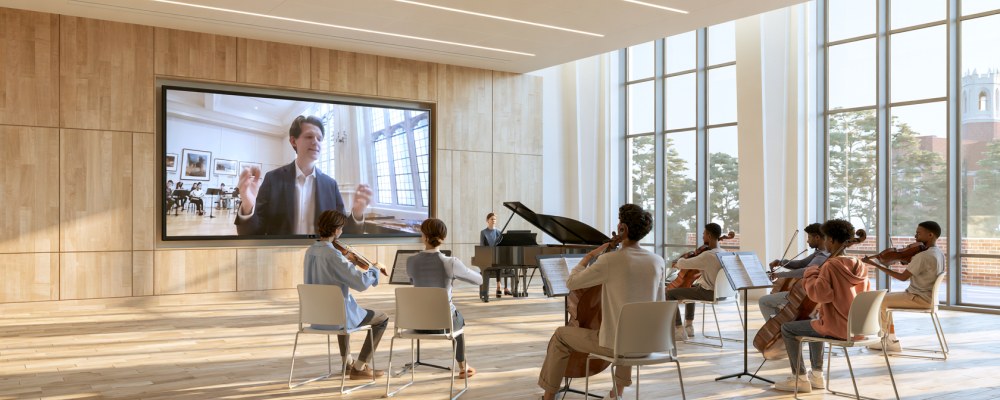
An individual online lesson is a dialogue between two people. A masterclass is a structured dialogue between the teacher, one or more performing students, and an audience of listeners who observe. The listener is not a bystander: their presence changes the teaching dynamic and multiplies the value of the event (one plays, ten or a hundred learn).
Three practical consequences:
- Clear roles are needed on the platform (who publishes audio, who only watches).
- A timing direction is needed: who speaks, when, for how long.
- A separate chat is needed where listeners can ask questions without interrupting.
The listener is not an audience: they are taking the class too
Someone who signs up as a listener is not watching someone else's lesson: they are taking their own. In in-person masterclasses the most formative part is almost always the time spent sitting in the hall, and the reason is simple: you hear the teacher work on the same passage with three different temperaments, you hear difficulties named that are also your own but that you would not have known how to pin down alone, and you watch a technical problem being untangled on someone else — the best possible condition for understanding it, because you are not playing and you are not the one being watched.
None of this is lost online, on two conditions: that the performing student's audio reaches the listeners with the same quality it reaches the teacher, and that the timing plan holds all the way through (those who listen without playing drop off sooner). This is why listener registration should not be treated as a low-cost fallback: it is the form of participation that makes up the numbers, that supports the event financially, and that takes home far more than the fee would suggest.
What going online takes out of the equation
For the student. Studying with a teacher who does not teach in your city has always been possible: the problem is hardly ever the registration fee, it is the costs around it. Travel, two or three nights in a hotel, meals, often days off work or school: a multiplier that turns a course of a few hundred euros into a figure not everyone can face, and that keeps out precisely those who live far from the main centres. Online the fee remains — the teacher's work is worth what it is worth — but everything else disappears. What changes is who can enrol, not what the teaching is worth.
For the teacher. The reasoning is the mirror image. An in-person masterclass reaches those who can physically get to that venue on that weekend; an online masterclass reaches anyone who is awake at that hour. With a reasonable command of English the audience becomes international, and for many instruments and repertoires the real demand lies outside national borders. It means filling a calendar without travelling, offering yourself to schools and conservatories in other countries, and building a recognition that no in-person masterclass tour could deliver in the same amount of time.
Why Zoom or Teams aren't enough for a music masterclass
Generic platforms support "everyone can speak" or "one speaks and everyone listens," but they don't distinguish between "the teacher speaks, the student plays, the listeners write in chat." Moreover, as discussed several times, audio quality is incompatible with serious music. A masterclass on Zoom is almost always a visible compromise.
A platform designed for music education (uwClassrooms includes a native masterclass mode) manages these roles and keeps the performing student's audio at 48 kHz stereo for all listeners — without differentiated compression.
Planning: the timeline of an online masterclass that works
- Recommended total duration: 2–3 hours (beyond that, the online audience's attention drops drastically).
- Number of performing students: 3–5 in 2 hours (20–25 minutes each).
- Opening: 5–10 minutes of introduction by the teacher (who they are, what they'll cover, what they'll look for in the students).
- Work with each student: performance (5–8 min) + teacher-guided work (12–15 min).
- Break: 10 minutes after the second student, so the audience can step away and return.
- Closing: 10 minutes of public Q&A with the questions collected in the chat.
How many people you actually need: one
An online masterclass can be organized single-handedly. A teacher who wants to run one does not need to put a staff together: prepare the running order, invite the students who will play, open registration to listeners, and show up on time. Everything else — who publishes audio, who only listens, who writes in the chat — is held by the platform, which is exactly why a masterclass mode exists instead of a generic "invite everyone to the meeting".
There are then two figures that improve the event when they are there. Neither one is a requirement:
- A moderator keeps an eye on the chat and on timing. Convenient when the audience is very large and questions arrive by the dozen; with a normal audience the teacher handles it without losing the thread, because listeners write and do not interrupt.
- A technician checks the students' audio and video before the start. This too is a convenience: each student can run the check on their own, in the minutes before entering the room.
For a school or conservatory that schedules masterclasses all year round, a fixed staff makes sense: it is hours saved at every event. For an individual teacher it is not a starting condition — and it is worth saying plainly, because anyone postponing their first masterclass in the belief that "it would take a team" is postponing over a problem they do not have.
Promotion: how to fill an online masterclass
- Announcement 4–6 weeks in advance on the school's channels (website, newsletter, Instagram, Facebook).
- Graphic poster with the teacher's photo, program, date, and time.
- Free registration for listeners (email collection for a future audience). Payment for performing students.
- Reminders at 7 days and 24 hours: without reminders, 30–50% of registrants forget.
- Recording available for registrants for the following 48 hours. This significantly increases the number of registrants, because many sign up "to watch it later."
Common mistakes
Treating the masterclass as a longer lesson. Without a timing plan decided in advance, the first student takes forty minutes and there is no room left for the last two. Write the plan beforehand and keep it in front of you during the event.
Not having the audio checked beforehand. The student arrives with the built-in microphone of their laptop and their performance sounds terrible to a hundred listeners. No technician is needed: just ask each of them to connect a few minutes early and run the audio and video check themselves, before entering the room.
No recording. An online masterclass is an asset that lasts over time. Record it, even just for internal archiving. If you have the rights, put it online (even just a 3-minute clip as a trailer for the next one).
What changes with uwClassrooms
uwClassrooms has a native masterclass mode: it separates the roles of teacher, performing student, and listeners, keeps audio at 48 kHz stereo for everyone, manages a dedicated chat, and supports full recording of the event. For a school, this means having a dedicated tool without having to combine four different platforms to achieve the same result.
The rest is a matter of simplicity: setting up a masterclass, coordinating the lessons, running them and closing them should stay within reach of the teacher, with no new trade to learn and no need to depend on support to enter the room — which holds for whoever teaches, and just the same for the students and the listeners.
In summary
A high-quality online masterclass requires planning, direction, and the right tools. A generic platform is not enough: you need defined roles, professional audio, and a timing structure designed for an online audience. When these three elements come together, the online masterclass becomes a high-value educational and positioning channel — accessible to an audience far larger, geographically, than a physical one. For the student it means working with teachers otherwise out of reach, without the travel costs that usually decide whether to enrol at all; for the listener, learning by following the work done on others; for the teacher, an audience no in-person tour would reach in the same amount of time.
Want to organize your next masterclass on uwClassrooms? Contact us: we'll help you structure it with your staff.